Safari
At a glance
Current status
| Detail | Description |
|---|---|
| Mechanism | Intelligent Tracking Prevention |
| Originally deployed in | Safari 11 (2017), as ITP 1.0 |
| User controls | ITP doesn’t let users control how it works. Users can simply toggle ITP off by unchecking “Prevent cross-site tracking” in Safari’s Security preferences. |
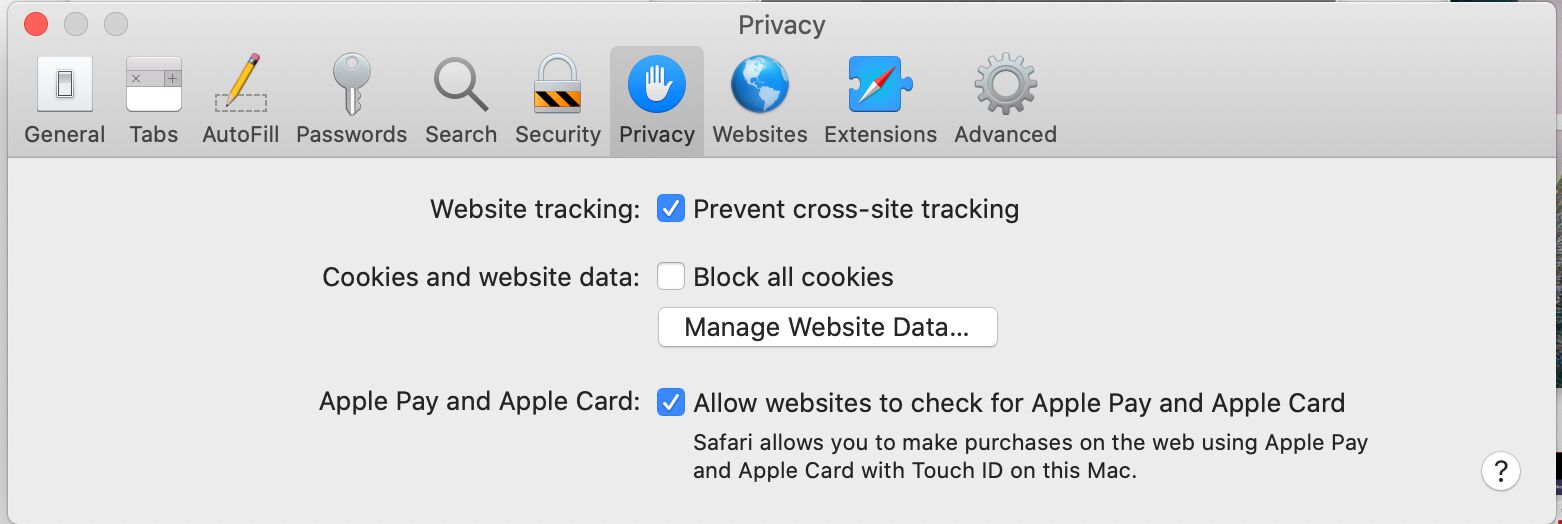
Privacy controls in Safari
For a comprehensive overview of all WebKit’s tracking preventions, see this document.
Classification of “known trackers”
Since introducing the Privacy Report in Safari 14, Safari has been using the Tracker Radar to classify origins as “known trackers”. This is mainly used to provide content for the Privacy Report, and has no real functional value. However, Safari’s IP obfuscation, released in Safari 15, utilizes these “known trackers” to determine in which requests the user’s IP address should be obfuscated.
Other than the above, Safari classifies domains capable of cross-site tracking using an algorithm that runs on-device. Thus each Safari user has a potentially different list of domains that are blocked from having access to browser storage.
The algorithm is superficially described in this blog post:
A machine learning model is used to classify which top privately-controlled domains have the ability to track the user cross-site, based on the collected statistics. Out of the various statistics collected, three vectors turned out to have strong signal for classification based on current tracking practices: subresource under number of unique domains, sub frame under number of unique domains, and number of unique domains redirected to. All data collection and classification happens on-device.
If a domain is classified by Safari as having cross-site tracking capabilities, it will have several restrictions placed upon it, listed below.
To monitor the list of domains classified by your Safari instance, or to test ITP in action, you can utilize the ITP Debug Mode, with instructions for use found behind this link.
Blocking of known trackers
Starting with Safari 27, Safari blocks cross-site requests to identity resolution services, also known as “ID graph” providers. These services match identifiers such as hashed email addresses, IP addresses and device signals to link the same person across sites and devices, which gets around the cookie restrictions described below.
The blocking is on by default whenever “Prevent cross-site tracking” is enabled, which is the default setting.
- Only cross-site subresource requests are blocked, such as scripts, pixels and frames loaded by another site.
- Navigations to these services (the user visiting the service’s own site) and same-site requests are not blocked.
- Apple maintains the list of blocked domains and can update it without a Safari update. The list is not public.
Apple’s announcement doesn’t list domains. A WebKit bug report about over-blocking mentions requests to domains such as uidapi.com, id5-sync.com, rlcdn.com, pippio.com, permutive.com, ad.gt and adsrvr.org being affected. Blocking of adsrvr.org was narrowed in the iOS 27.2 beta after the report.
Other than this, Safari does not block requests to known trackers by default. Instead, Intelligent Tracking Prevention restricts what classified domains can store (see below).
Third-party cookies
Safari blocks all access to cookies in third-party context.
To support legacy federated login scenarios, an exception to the rule above is a temporary compatibility fix that was introduced in ITP 2.0. This fix applies to scenarios where a site opens a pop-up to a federated login service and then relies on third-party cookies to persist the login on the site itself. If the user interacts with the pop-up, Safari gives the pop-up’s site access to its cookies when it is embedded on the site that opened the pop-up. It gets no access when embedded on other sites.
This still worked in a test with Safari 26 on 30 October 2026. How long the access lasts was not tested.
Note that this is listed as a temporary fix and could be invalidated at any time. Because the pop-up already requires user interaction (the login action itself), WebKit recommends to use the Storage Access API for proper handling of third-party storage access (see below).
Safari supports an opt-in flag for cookies: Partitioned;. It first shipped in Safari 18.4 (March 2025), was removed in 18.5, and returned in Safari 26.2. This is part of the Cookies Having Independent Partitioned State proposal (CHIPS). Cookies with this flag can be accessed in third-party context, but they are partitioned between the site sending requests to the third-party and the third-party itself. Cookies in a partition cannot be accessed by other sites that also communicate with the same third-party. Domains flagged by ITP cannot access cookies in 3P context, even with the Partitioned; flag.
Storage Access API
Safari introduced the Storage Access API in February 2018. With the Storage Access API, a website can ask the user’s permission to access storage in an embedded cross-site resource which would otherwise have its cookie access restricted.
To be able to use the Storage Access API, the embedded site must have been interacted with in first-party context (URL in address bar) in the last 30 days of Safari use.
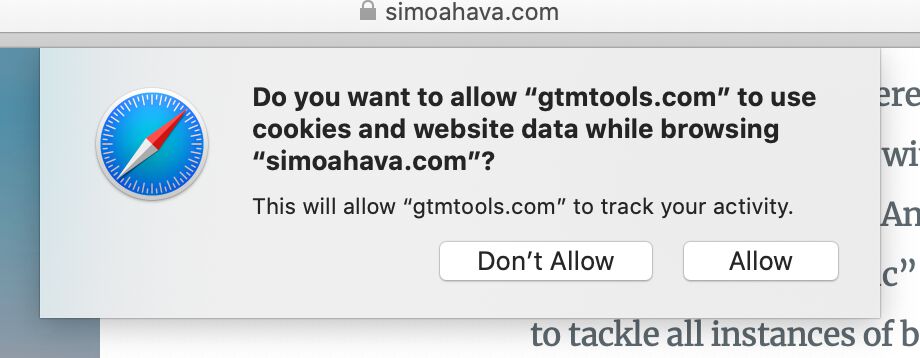
Requesting storage access via the API
If the user has interacted with the embedded site in first-party context in the last 30 days of Safari use, and the site has cookies set, the site can call the Storage Access API upon a user interaction in the embed (such as a click or tap), after which Safari will prompt the user if they want to allow the embedded site to access its storage.
Safari prompts the user for each embedded site that hasn’t been granted access before, and a grant expires after 30 days of browser use without interaction (source).
If the user doesn’t interact with the site again in first-party context in 30 days of Safari use, Safari will clear all storage from the embedded site, and prevent any new storage from being set. This will continue until the user interacts with the site in first-party context again.
First-party cookies
Safari deletes all script-writable storage on websites if the site has not been interacted with (click, tap, keyboard input) in first-party context in the last 7 days of browser use. This includes cookies set with document.cookie.
If the referring domain is a known tracker, and if the URL has query parameters (?key=value) or fragments (#somevalue), cookies set with JavaScript’s document.cookie API have a maximum expiration of 24 hours.
Classified domains are an exception. If ITP has classified a domain as a tracker and the user hasn’t interacted with it as a first party (visited it and clicked, tapped or typed) in 30 days of browser use, Safari deletes all its site data, including cookies set with Set-Cookie. This affects first-party cookies on sites that ITP has classified, which site owners don’t always expect (source).
Other first-party cookies set with the Set-Cookie HTTP response header are not impacted by ITP, and have no restrictions placed on their expiration, unless they meet the criterion for CNAME cloaking (see below).
Other third-party storage
localStorage is partitioned, so that access is keyed to the combination of the source and target domains. Thus www.domain.com has a different localStorage store in third-party context when accessed from www.domain1.com and from www.domain2.com. This partitioned store is also cleared between application launches.
sessionStorage is partitioned in a similar way (source).
IndexedDB is also partitioned, and it is cleared when Safari quits.
The HTTP cache for third-party content is partitioned by top-level site as well, which Safari has done since 2013.
Other first-party storage
All script-writable storage is deleted in 7 days of browser use since last interaction with the site (click, tap, or text input). This includes these mechanisms:
- Cookies set with
document.cookie(see above). - IndexedDB
- LocalStorage
- Media Keys
- SessionStorage
- Service Worker registrations and cache
Web apps that the user has added to the Home Screen keep their own count of days of use, separate from Safari, so WebKit doesn’t expect their first-party data to be deleted (source).
CNAME cloaking
If a subdomain has a CNAME alias to a cross-site origin, then any cookies set with Set-Cookie HTTP response headers will be restricted to a maximum 7 day expiration.
Since Safari 27.2, this cap no longer applies to cookies set by the response to a top-level navigation, the page the user is opening. Before 27.2, a site whose own hostname is a CNAME to another domain, as is common with hosting providers and CDNs, could have its cookies capped at 7 days by mistake.
If a subdomain is set with A/AAAA records that resolve to an IP address where the first half of the address does not match the first half of the IP address for the website the user is currently browsing, then any cookies set with Set-Cookie HTTP response headers will be restricted to a maximum 7 day expiration.
Fingerprinting
In Safari 26, no noise is added to APIs that are commonly used for fingerprinting in default browsing. In a test on 30 October 2026, the HTML canvas fingerprint was identical on different sites and after restarting Safari.
On macOS Safari, the version number in the User Agent string is frozen to 10_15_7 to fix compatibility issues with upgrading to macOS version 11+ (Big Sur). This has obvious privacy implications as well, as the platform version is no longer useful for fingerprinting purposes.
Referrer
Safari has the default Referrer Policy of strict-origin-when-cross-origin.
In third-party requests, Safari always downgrades the referrer to the origin, even if the page sets a looser policy. Thus if a page on https://www.domain.com/page/page.html tried to load an image from https://images.imagecdn.com, the referer header would show https://www.domain.com rather than the full referrer. The same applies to document.referrer in embedded third-party content. In a test on 31 October 2026, a cross-site fetch() from a page with the unsafe-url policy sent only the page’s origin.
Furthermore, if the referring domain is a known tracker, and if the referring page has query parameters (?key=value) or fragments (#somevalue), the document.referrer property is downgraded to effective top-level domain plus one part (eTLD+1). Thus a request originating from https://sub.classified.domain.com/page?userId=abcd1234 would end up as https://domain.com in the document.referrer property of the landing page.
In navigations to other sites, however, a site can loosen the policy. In a test on 31 October 2026, a page with the unsafe-url policy sent its full URL, including the query string, when navigating to another site.
Other
Safari also protects against first-party bounce tracking. Bounce tracking happens when instead of navigating the user directly to the target domain, the user is redirected through intermediate domains which can set cookies and build a profile of the user. Intelligent Tracking Prevention detects when domains are used solely for bounce tracking and clears all website data that might have been saved on them.
Similarly, Safari protects against tracker collusion, where multiple tracking domains in a redirect chain can feed information to each other to build a comprehensive profile of the user. If one domain in this chain is classified as having cross-site tracking capabilities, then all domains in the redirect chain will be classified as well.
With Safari 14, WebKit’s tracking preventions are extended to all browsers running on the iOS platform. There is no way for the browser or any app using the browser to toggle these protections off. Only the user can opt-out of cross-site tracking protections.
WebKit browsers also delete all site data (script-writable storage, all cookies) if the site domain has been classified by ITP and if there has been no meaningful interaction with the site in first-party context in the last 30 days. Granted access through Storage Access API resets the timer as well.
Private Click Measurement (PCM) is on by default. It lets an advertiser learn that an ad click led to a conversion, with only limited, delayed data and no cross-site identifier.
With Safari 15, the browser hides the user’s actual IP address in requests sent to origins that are listed in DuckDuckGo’s Tracker Radar list.
History
Safari 27.2 stops capping cookies on CNAME-hosted sites
Cookies set by the response to a top-level navigation are no longer capped at 7 days when the site’s own hostname is a CNAME to another domain, such as a hosting provider.
Safari 27 blocks identity resolution services
Cross-site requests to “ID graph” services, which link the same person across sites and devices, are blocked whenever “Prevent cross-site tracking” is on. Apple maintains the list of domains.
CHIPS returns in Safari 26.2
Partitioned cookies with the
Partitionedattribute are supported again, after being removed in Safari 18.5 for further work.Safari 18.4 supports partitioned cookies (CHIPS)
Cookies set with the
Partitionedattribute work in third-party context, kept separate for each top-level site. The feature was removed again in Safari 18.5 (May 2025) and returned in 26.2.Safari 15 hides the IP address from known trackers
Requests to known trackers no longer reveal the user’s IP address.
Safari caps cookies from CNAME-cloaked subdomains
Cookies set by HTTP response from a subdomain that is a CNAME alias for a third party expire after 7 days at most.
WebKit's protections extend to all iOS browsers
With iOS 14, Intelligent Tracking Prevention applies to every browser and in-app browser on iOS, since they all use WebKit. Only the user can turn it off.
Safari blocks all third-party cookies
Safari 13.1 blocks third-party cookies for all domains, not only classified trackers, and caps all script-writable storage at 7 days of browser use without interaction.
ITP 2.3
Script-writable storage is deleted after 7 days without interaction on sites reached via known trackers, and
document.referreris trimmed for them.ITP 2.2
Cookies set by script on pages reached from a known tracker with link decoration expire after 24 hours.
ITP 2.0
Classified domains lose third-party cookie access immediately, unless granted through the Storage Access API or the pop-up compatibility fix.
Intelligent Tracking Prevention 1.0
Safari starts classifying cross-site trackers on the device and restricting their cookies.